Finally take control of your money.
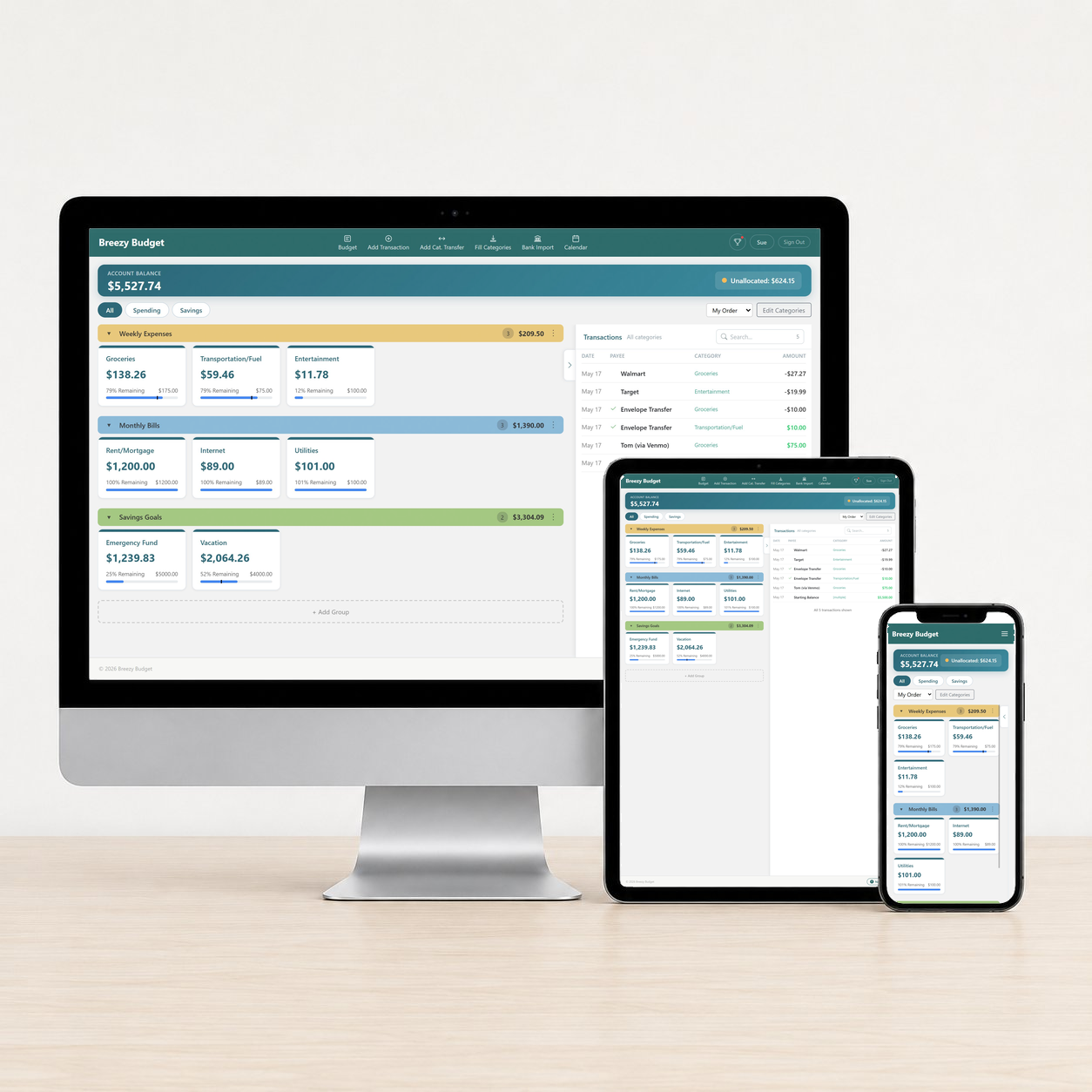
Divide the money in your accounts into your categories (groceries, rent, fun stuff). See what you have left to spend at a glance. Every dollar, sorted. Every category, current.
The problem
Most people track their money… by not tracking it.
We've all done one (or more) of these:
Constant balance checking
"Let me log into my bank app… again."
Mental math
"I think I have enough to eat out… probably?"
Homemade spreadsheets
"I'll update this… eventually."
Here's what happens
Money anxiety
Never knowing if you can actually afford something creates background stress that follows you everywhere.
Accidentally overdrawn
Your checking account balance looks fine — until the rent is auto-paid.
The "I'll start Monday" loop
Your spreadsheet falls behind, so you promise to catch up on Monday. Then next Monday. Then the Monday after that.
Envelope budgeting fixes this. Every dollar gets a job before you spend it — so the number you see is a number you can trust.
The solution
Know what you can spend in each area of your life — before you spend it.
Breezy Budget uses envelope budgeting — the simple system that's worked for generations, now without the cash and mason jars. You divide your income into categories when you get paid, and log every purchase against one of them. So you always know exactly how much is left to spend in each part of your life.
Bank app balance shows
$2,000
🤔 Can I spend this?
🤑 Yes — go enjoy it!
Check once, done
Open Breezy Budget to see what you can spend in each category. That's it.
The math is already done
Every purchase comes out of the right category. You see what's left in each one — not a lump-sum bank balance.
Setup in minutes
Pick a few categories and divvy up your current balance. You're budgeting in five minutes — not building formulas on a Sunday night.
Built for real life — not finance nerds.
Other budgeting apps assume you want pivot tables, net-worth reports, and your credit utilization ratio. Breezy Budget assumes you want to know what you can spend on groceries this week.
Free for 21 days, no credit card required. If envelope budgeting isn't for you, just walk away — there's nothing to lose.
What makes it different
Two ways to see your money. Other apps force you into one.
Breezy users plan their money — the question is what kind of plan. Some plan a whole month at a time, track it, and see how it went at the end. Others plan how they'll divide each paycheck into categories as it lands, then track their spending from there. Either way, you get both.
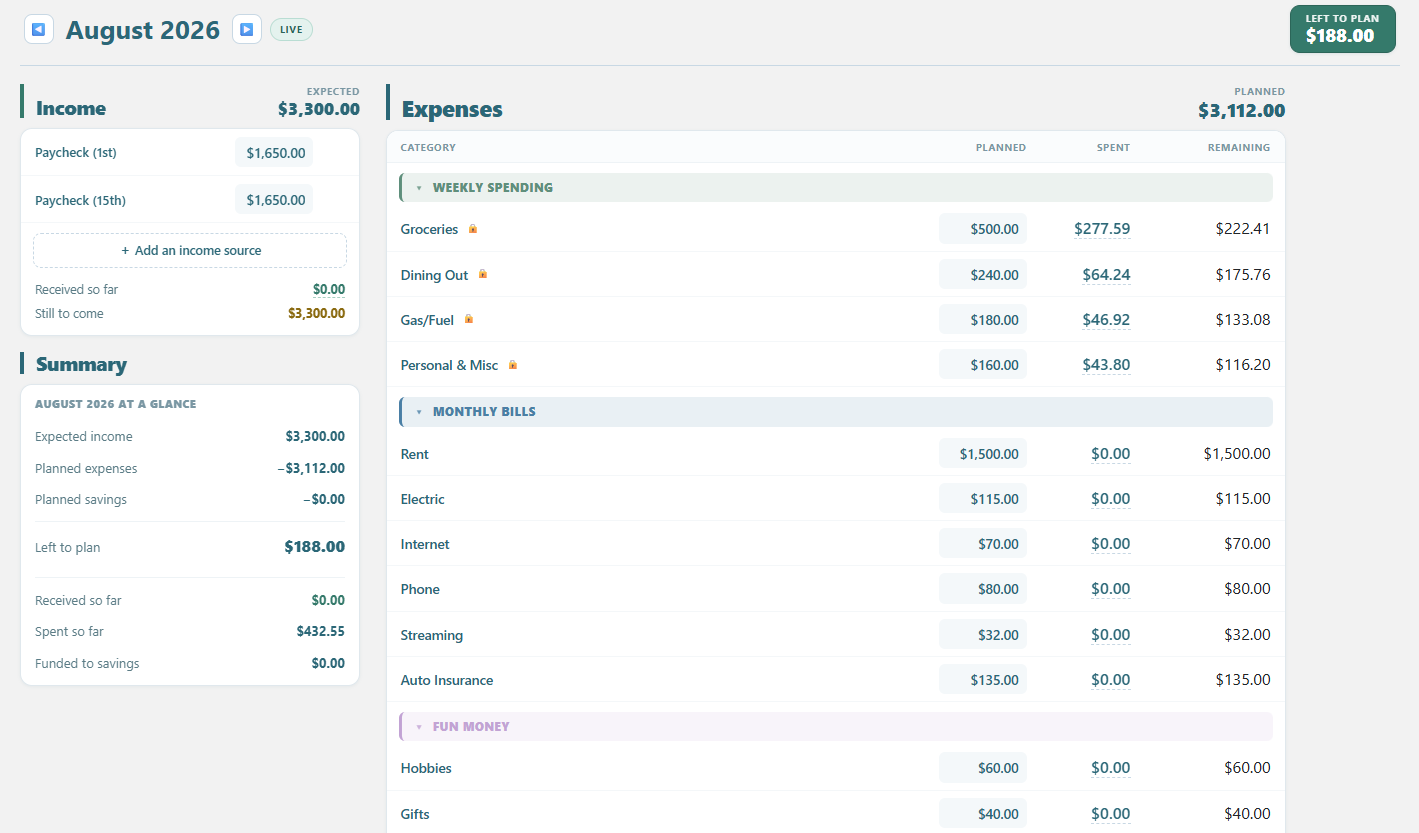
Plan the month, then track it
Budget View is for people who want to see the whole month at once and decide, up front, where every dollar will go. You lay out the income you expect, assign it across your categories before the month starts, and then the view shows you planned-vs-spent side by side all month long — so at any moment you know whether you're on track or drifting. When the month ends it becomes a report card you can reopen to see how you actually did.
Months here have walls. Nothing rolls across the 1st — each new month starts from a clean plan. That's the point: it keeps the plan honest and comparable month to month.
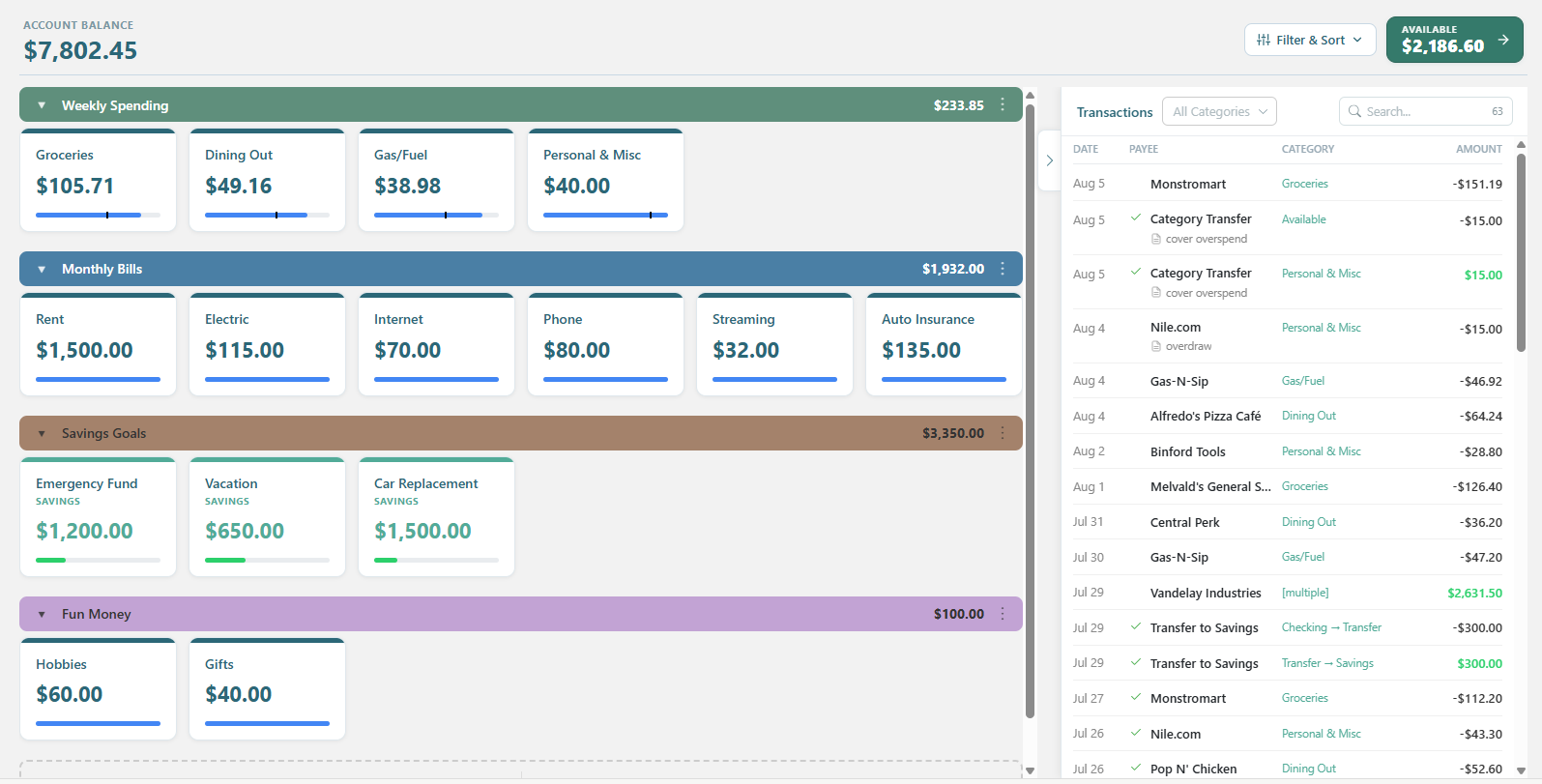
Know what's left, right now.
Tracking View is for people who want a live, always-current picture and would rather steer day to day than plan the whole month up front. Every category shows exactly what's in it today. You log spending as it happens, move money between categories the moment one runs short, and fill everything back up on payday. Balances roll forward — nothing resets on the 1st — so the view is never a plan, just the true state of your money at this second.
There are no month boundaries, which is the trade-off: you can't reopen "how did February go" the way Budget View lets you, because Tracking isn't keeping chapters — it's keeping a running balance. And income here isn't a monthly total; it's a sequence of paychecks, each funding its own set of bills — first check covers these, second check covers those.
Getting started
Get Started in Minutes
No complicated setup, no learning curve
Create your free account
Sign up with just your email — no credit card, no payment info. You're looking at your own budget in about 60 seconds.Free for 21 days, and you can cancel anytime.
Set up your categories
Rent, groceries, gas, fun money, the vacation fund — whatever matches how you actually live. Choose from preset categories or create custom ones.Free 1-on-1 setup if you'd rather do it with someone.
Know what's available to spend
Every purchase comes out of a category, so every balance stays current. Wondering if you can afford it? Don't guess — just check.An answer you can trust, without the mental math.
Want to look around first? On your first sign in, choose between a fully set up sample account or a blank account. Explore how everything works before adding your own data. When you're ready, clear the sample data and start fresh.
What's included
Everything you need. Nothing you have to study.
Every account in one budget
Checking, savings, and credit cards — tracked separately, budgeted together. See one account or your whole picture.
Automatic transaction downloads
Direct connections to your financial institutions. Transactions show up on their own; you decide which category they hit.
Unlimited categories and groups
As many as you want, organized how you want. No tier limits, no add-ons, no upsells.
Budget templates
Save a month's plan and reuse it. Copy last month forward and adjust only what changed.
Works on any device
It's a web app. Phone, laptop, tablet — same budget, nothing to install, nothing to sync.
Real help from a real person
Free 1-on-1 setup whenever you want it. We'll help you get up and running.
Fit check
Who this is for
✓ For you if
Your paycheck lands in a bank account and leaves through debit, credit, Venmo, and Apple Pay. You want to know what you can spend without doing math in the checkout line.
Probably not for you if
You want portfolio tracking, tax optimization, or net-worth dashboards with investment performance. Breezy Budget is built around the money moving through your life month to month. It does that thoroughly — and it doesn't pretend to be a wealth management tool.

Why I built this
I built Breezy Budget because I was tired of guessing what I could actually spend. My bank balance said one number, but I never knew how much of it was already spoken for — rent, groceries, the car payment.
So I built the thing I wanted: one place that splits my money into categories and tells me how much is in each. It does that one thing well — and skips the pivot tables, the net-worth dashboards, and the mutual-fund upsells. If that's what you've been looking for too, I built it for you.
— Wayne
Founder, Breezy Budget
One plan. Everything included.
No tiers, no add-ons, no feature held back for a higher price.
- Automatic bank sync (from multiple banks)
- Unlimited categories
- Unlimited transactions
- Unlimited fill templates
- Budget View and Tracking View
- Bank file import & manual entry
- Transaction search & filter
- Spending calendar view
- Export your data (CSV/Excel/Google Sheets)
- Free 1-on-1 setup help
Less than a single overdraft fee — for a month of never getting surprised by one.
No credit card required. Cancel anytime.
Questions
Getting started
What if I've never budgeted before?
When you sign in to your free trial, select to have Sample Data. Then you can see (and play with) a fully set-up budget. You can also use that sample data to set up next month's budget, add transactions, everything.
You can also book a free 1-on-1 setup session with us and we'll walk you through setting up your account and getting started.
How do I get started?
Create your free 21-day trial account (here) and you're on your way. On first sign in you can load a fully set-up sample budget to explore, then clear it when you're ready for your own.
Want a hand? Schedule a free one-on-one setup session — we'll build categories that fit your life and show you how to set up your first budget. Totally optional, no charge.
Can I use this with a partner?
Yes. Sign in to the same account, and you'll both stay in sync with the same budget—on any device.
I've tried budgeting apps before and they were too complicated. Is this different?
Most apps try to do everything — predict corn futures, build reports, sell you mutual funds. Breezy Budget does one thing: helps you plan & track your everyday money by dividing it into categories. Simple tracking for normal people.
Actually...that would be two things (plan & track), but no more than that!
Can I see a finished budget before setting up my own?
Yes. When you create your trial, load a fully set-up sample budget with one click — categories, transactions, even a simulated bank sync. Click around before entering any of your own numbers, then clear the sample anytime from the button at the top of the screen.
Trial & billing
How does the free trial work?
You get full access to every feature for 21 days — no credit card needed. Not sure where to start? Load a sample budget to explore first, then clear it when you're ready.
If Breezy Budget isn't for you, just don't subscribe.
What happens when my trial ends?
You'll see a gentle reminder as the end approaches. If you haven't subscribed, your account switches to read-only — you can still see all your data, but can't add or edit.
You'll have a limited time to subscribe and pick up right where you left off.
Can I cancel anytime?
Yes. Cancel through the billing portal and you keep full access until the end of your current billing period.
What's the difference between monthly and yearly?
Both plans include every feature. The yearly plan saves you $19 compared to paying monthly — that's 2+ months free.
Banks & transactions
Do I have to connect my bank?
No. That is an optional feature. You can instead enter your transactions manually or you can import a file export from your bank.
How do transactions get into Breezy Budget?
Three ways, whichever you prefer: connect your bank for automatic sync, upload a file you download from your bank, or enter your transactions manually.
Bank connections run securely through Stripe, so Breezy never sees your bank login — and you still match each transaction to a category yourself.
Security
Is my bank and financial data safe?
Your data is stored securely, and we never share, sell, or use it for anything other than running your budget.
Bank connections are read-only and handled entirely by Stripe — the payment company trusted by millions of businesses — so Breezy never sees or stores your bank username or password, and it can't move money.
Prefer not to connect a bank at all? Import a file from your bank or enter transactions manually.
More questions? Email SupportTeam@BreezyBudget.com — real people, happy to help.
Stop guessing what you can spend.
21 days, free, no credit card. Connect your accounts, divide up your money, and find out what's actually free to spend.
Takes about 60 seconds to sign up.